
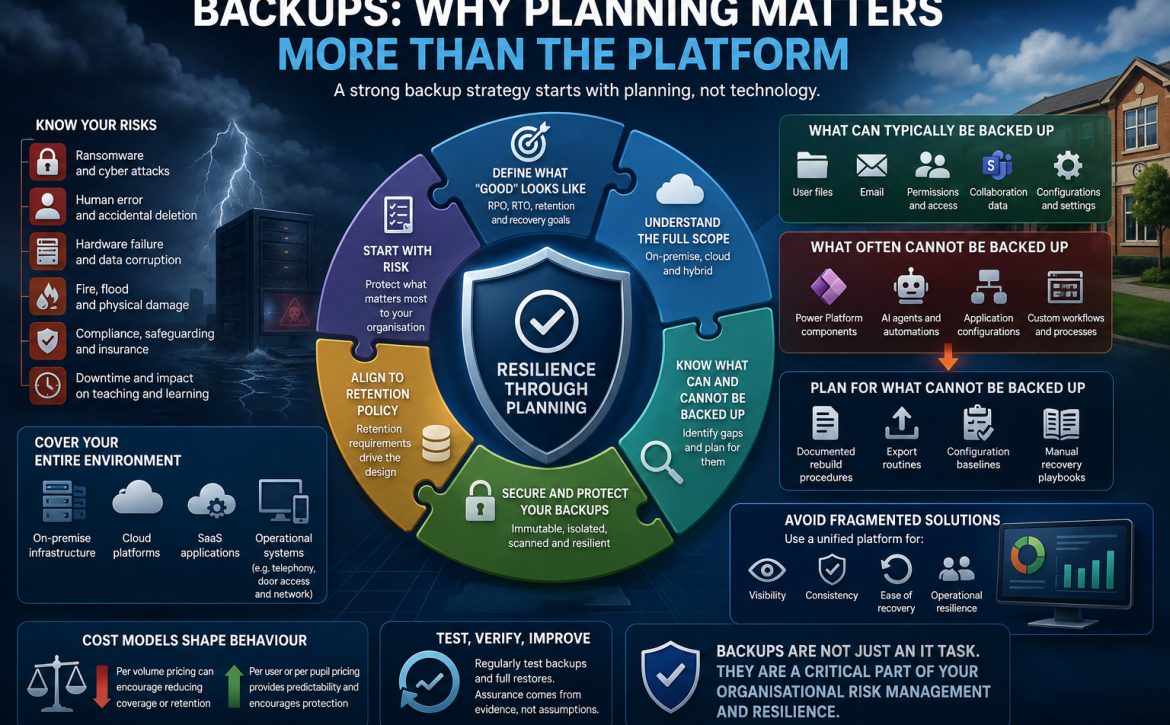
Backups: why planning matters more than the platform
Most leadership teams assume backups are in place and working. In reality, very few have ever seen a full recovery under pressure, across every system that matters. The result is a dangerous gap between perceived assurance and actual resilience. Backups are often treated as a technical checkbox, when they should be treated as a critical, testable part of organisational risk management.
When organisations review their backup strategy, the conversation often jumps straight to tools and platforms.
- Cloud or on-premise.
- Immutable storage.
- Per-user licensing versus per-terabyte pricing.
But the quality of a backup solution is not defined by the platform you choose. It is defined by the planning you do before you choose it.
Without that planning, even the most advanced solution will leave gaps.
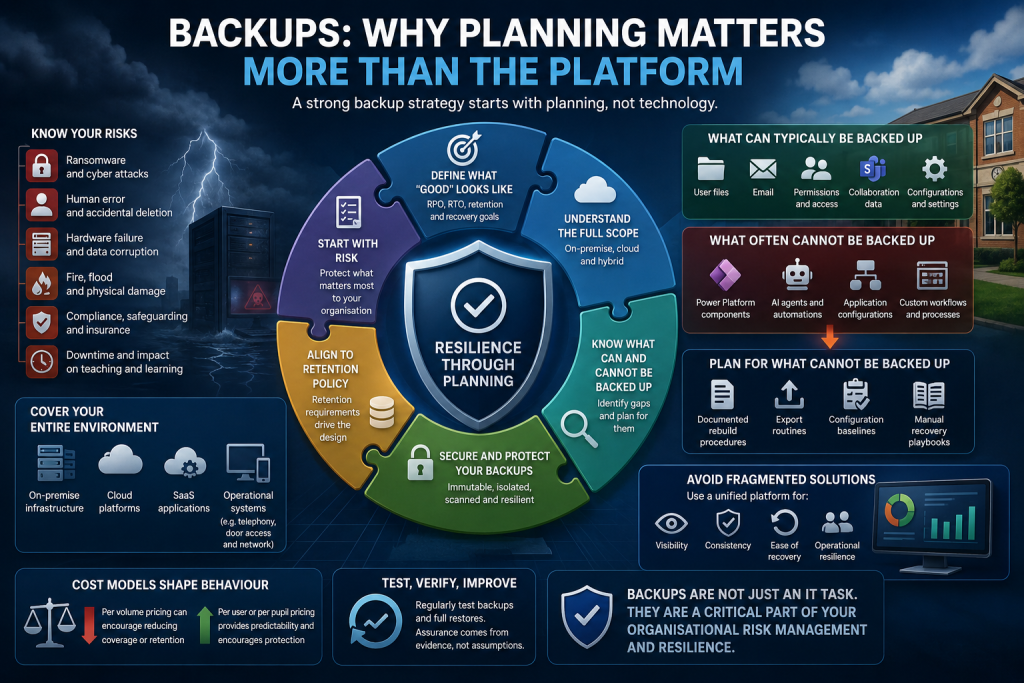
Start with risk, not technology
A good backup strategy starts with a simple but often overlooked question:
What are you trying to protect, and why?
This should be informed by:
- Previous experience of data loss
- Cyber security risks, including ransomware
- Physical and technical risks, including fire, flood, hardware failure and data corruption
- Insurance requirements, particularly cyber insurance expectations
- Business continuity needs and acceptable downtime
Backups are not just an IT function. They are a core part of organisational resilience and risk management.
Define what “good” looks like
Before selecting any platform, you need a clear definition of success.
That means understanding:
- What systems you have
- Data and file stores
- Servers (physical or virtual)
- Cloud services and SaaS platforms
- Operational systems such as telephony, door access and network infrastructure
- What needs to be backed up
- End user data
- Business-critical systems
- Configuration and access controls
- How quickly you need to recover
- Recovery Time Objectives (how fast systems must be restored)
- Recovery Point Objectives (how much data loss is acceptable)
- How long data must be retained
- Statutory requirements
- Internal policies
- Safeguarding and audit expectations
Too often, retention is an afterthought. In reality, it should be a primary design principle.
Align backups to retention policy, not the other way around
Retention requirements should drive your backup design.
For example:
- Safeguarding records may need long-term retention
- Financial records may have statutory retention periods
- Operational data may only need short-term recovery
- Loss of coursework and curriculum resources will impact pupil outcomes
If your backup platform cannot support these requirements, or makes them cost-prohibitive, then it is not the right platform.
A common failure is selecting a solution based on cost per terabyte, then reducing what is backed up or how long it is retained to control costs. This introduces risk silently and often unintentionally.
Understand the full scope of what needs backing up
A comprehensive backup strategy must consider the full estate:
- On-premise infrastructure
- Cloud platforms
- Hybrid environments
In modern environments, particularly in schools and multi-academy trusts, a large proportion of critical data sits in the cloud.
This introduces a key risk: assuming that cloud platforms are already fully protected against accidental deletion, data corruption or cyber attack.
In most cases, they are not.
What can typically be backed up from cloud platforms
- User files
- File permissions
- Sharing permissions
- Collaboration platform data and configurations
Understanding what cannot be backed up is as important as knowing what can be. You must not assume that everything is covered.
What often cannot be backed up
This is where many strategies fall short.
Certain elements are either not supported by backup tools or require manual processes, for example:
- Power Platform components
- AI agents and automation routines
- Some application configurations and workflows
These gaps must be explicitly identified and managed. If they are not, you do not have a complete backup strategy.
Plan for what cannot be backed up
Where systems or components cannot be backed up automatically, you need compensating controls.
This may include:
- Documented rebuild procedures
- Export routines where possible
- Configuration baselines
- Manual recovery playbooks
A backup strategy that ignores these elements creates a false sense of security.
Security matters as much as backup
Backing up data is only part of the challenge. Protecting those backups is equally critical.
Key questions to ask include:
- Are backups immutable and protected from tampering?
- Can malware or ransomware reach your backup environment?
- Is backup storage genuinely isolated from production systems?
- Does the platform scan for encrypted or suspicious data during backup?
- Are your backups protected from hardware failure, fire and flood.
If backups can be altered or deleted by an attacker, they cannot be relied upon in a recovery scenario. Suppliers should be asked for explicit confirmation of how backups are protected and if backing up on premise, you should be able to demonstrate how your backup data is protected from malicious attack.
Avoid fragmented solutions
Many organisations end up with multiple backup platforms:
- One for on-premise servers
- One for cloud services
- Separate tools for different systems
This creates:
- Complexity
- Increased cost
- Reduced assurance
- Dependency on specialist knowledge
Where possible, a unified approach with a single platform and dashboard improves:
- Visibility
- Consistency
- Ease of recovery
- Operational resilience
In multi-school environments, this becomes even more important, enabling central oversight while supporting individual sites.
Cost models shape behaviour
The way a backup solution is priced can significantly influence decisions.
- Per volume pricing can encourage reducing coverage or retention
- Per user or per pupil pricing can provide predictability and encourage full coverage
It is important to recognise these incentives and ensure cost does not drive risky decisions.
Alignment with DfE digital and technology standards
The points above are not just good practice. They align directly with Department for Education expectations for schools and trusts.
The DfE standards make several things clear:
- Backup and recovery must form part of a wider business continuity plan, identifying critical systems and risks
- Backup strategies must be tested, not assumed, to provide assurance that services can be restored when needed
- Schools should have a data backup plan that is reviewed regularly, typically at least annually as part of cyber security governance
- Cloud solutions must include appropriate data protection, availability and backup arrangements rather than relying on the platform alone
These standards reinforce a key message: backups are only meaningful if they are planned, complete and proven to work.
They also highlight a gap that often exists in practice. Many organisations:
- Have backups configured but not formally tested
- Rely on cloud retention rather than true recovery capability
- Cannot clearly demonstrate how all critical systems would be restored
From a DfE perspective, that is not sufficient.
The key takeaway
A backup strategy is not a product decision. It is a design decision.
The most important steps are:
- Define your risks and requirements
- Map your full estate
- Align backups to retention policies
- Identify and manage gaps
- Ensure backups are secure and isolated
- Test recovery regularly as part of business continuity planning
Only once those are clear should you choose a platform.
Because ultimately, the question is not:
“Do we have backups?”
It is:
“Can we confidently recover everything that matters, when we need to, and can we prove it?”